Tag Archives: technology

Explaining my job using only the 1000 most commonly used English words

A few weeks back the xkcd web comic posted a cartoon illustrating how a rocket works using only the 1000 most commonly used words in English. This kicked off the Up Goer Five challenge: describe your job using only words from that list. It’s a lot harder than you might think:

I write and draw to explain hard-to-understand things like computers.

I talk to people who make the hard-to-understand things and figure out how to explain the things to people who have to use the things. I talk to people who have to use the things to find out how they use the things. I show the people who make the things how to make the things easier to understand and use.

I figure out how to write stuff and draw stuff once but use it in many places in a way that if we change it one place it changes at all the other places. I figure out how to make the stuff we write and draw once that appears in many places change in ways that make sense in each place it is used, but not change when it isn’t supposed to.

I figure out where the stuff we write and draw is seen. I figure out how to make the stuff we write and draw be in the places it should be without us doing it each time. I figure out where people who need the stuff we write and draw will look for it. I figure out how to make the stuff we write and draw be in the place people who need it will look for it. I figure out how to keep the stuff we write and draw that most people don’t need out of their way but still easy for the people who need it to find. If figure out how to put the stuff we write and draw where we can find it quickly when we need to change it.

I make the things that makes all the stuff we write and draw do all these things. I keep the things I make working. I fix the things I make when they don’t work. I figure out why other things made by other people but that we have to use are not working, and then figure out how to make them do what we want even though they were never meant to do that.

I do things with words most people don’t know that words can do. If I do it right, the people who use them don’t even realize the words are doing the things. My job is not to make the things I do be noticed. My job is to help people who use the hard-to-explain things know how to use them without knowing they are learning.

This was hard because what I do is extremely meta. The words “information,” “arrange,” “organize,” “design” can’t be used. Even the word “itself” is unavailable, so when I wanted to write that the things we write and draw change themselves depending on where they are being seen, I couldn’t. Oh, and “tool” isn’t allowed. Anyway,

You can try it yourself here.

Just in (unseasonal) time

I realized this weekend that the wall calendar is soon to go the way of the phone book.

In previous years, while I was out Christmas shopping, I was constantly coming across racks of wall calendars for the following year. There would be scores of different calendar designs at some places. And most years I would see one that leapt off the shelf at me, “Oh, I have to give this one to Michael!”

Some years we each gave the other multiple wall calendars. Which was fine. We need them in multiple locations in the house. At a minimum, one upstairs and one down. And I have always had one at work. At work I also always have a year-at-glance style calendar. While the latter technically makes the former redundant, I use them for slightly different ways of thinking.

Plus, I like having some interesting art or a photograph to look at that changes every now and then.

Don’t get me wrong, there are still wall calendars for sale in stores. But this year I noticed that the displays were far smaller and less varied. It’s always been the case that the variety of cute kitten or puppy calendars outnumbered everything else, combined. And lame landscape photo collections came in a close third.

But this year, those were the only ones I ever found!

So I didn’t buy any before Christmas. And when I realized that the only 2013 wall calendar either of us had was the Brony calendar several of our friends did art for, I went looking specifically for a good downstairs calendar for the house and one for my cube at work.

It’s not just that there wasn’t ones that appealed to me–a lot of places that I could previously count on to be selling slightly discounted calendars for a couple months after New Years didn’t have any calendars in stock at all.

I did see a couple at the FedEx store, of all places, that would have been acceptable. I probably should have grabbed them, but that would have meant getting in the checkout line after we’d finished our shipping business, and we were on a schedule.

And it’s also true that I far more often consult the calendar app on my phone (which automatically synchronizes with my calendar app on my laptop), so I don’t really need a hard copy calendar hanging on the wall. It is slightly convenient having the hard copy, but it has more to do with habit than need.

I don’t think that demand is going down nearly as fast as the practical obsolescence of the phone book. I suspect the lack of selection in brick and mortar stores is as much to do with online shopping as more and more of us using calendar apps. The wall calendars that physical stores will carry are going to fall into the categories of things that people will buy on impulse or out of desperation because they don’t know what else to buy Aunt Martha.

It only took me two minutes online to find a couple of calendars I liked and order them. So I’m contributing to that part of the process.

Not that it’s a bad thing. I just need to learn some new habits.

And we all know how easy and fun that always is, right?

Right?

Joyous voices sweet and clear

Several years ago, my hubby bought me an iPod Nano for my birthday. I had been resistant to the notion of an iPod. I was used to the ritual of changing out discs in a carrying case I kept with me to use with my portable disc player, and I just didn’t quite see the point.

The funny thing was that I had iTunes installed on my computer and had imported a bunch of my music CDs into its library. One of my Palm Pilots had used iTunes to synch music, so I had given it a try. I hadn’t been terribly impressed with the experience, but I had found iTunes on the computer a bit easier to use than other music playing software, so I had kept it.

The iPod quickly changed my mind. The convenience of something that fit in my pocket and replaced both the portable player and the carrying case with all those discs should have been obvious, I suppose. I found myself importing music like crazy, because the small number of discs I’d imported before that would hardly fill the Nano’s humongous 4 gigs of space.

I spent most of the Thanksgiving weekend importing Christmas music, and wound up with about 3 gigs worth of holiday songs. That left enough room on the Nano for a Scissor Sisters album, a few Queen albums, and my podcasts. So I could set the entire iPod music collection on shuffle for the month of December. I would get mostly Christmas music, with an occasional non-Christmas song to break things up.

And, of course, the iPod carried a much larger portion of my Christmas music collection than I’d been able to carry around in that case for discs.

The following year, Apple released the very first iPod Touch about a week before my birthday. Guess what my hubby gave me for my birthday? I think he got me the 16gig model, which seemed enormous. It was enough of an incentive to get me working a bit more seriously at importing all of my music collection on disc into the computer. I don’t remember how much of my Christmas music I got imported for that second Christmas (and because of a hard disk crash a few years ago, I can’t use the “date added” information in iTunes to make a guess–iTunes thinks the date added for about half my library is the day I bought the new hard disk and started restoring from backup), but it was far less than 16 gigs, and so I had start making big playlists if I wanted to have something I could randomize to give me hours of Christmas music while working.

Christmas music is one of my obsessions. I usually start listening to it a day or two after Thanksgiving and keep listening to it through Three Kings Day. Unfortunately, my hubby is one of those people who really dislikes Christmas music, or at least a lot of it. I’ve managed to figure out a bunch he can stand, and load that up in the player for the car. Otherwise, I listen to it when he’s in the other room or try to remember to use my headphones.

My hubby’s not the only person I know who has issues with at least some kinds of Christmas songs. I know a lot of folks who have problems with the specifically religious music. As a gay kid growing up in a very conservative and uptight denomination, I understand. Some sacred music triggers memories of very bad experiences. I get that what some people hear in those songs is, “You must conform to this belief system that has oppressed you, or else!”

My particular idiosyncrasy is that traditional religious Christmas songs just don’t register that way for me. I know all the words to “O, Holy Night” in more than one language (my Latin’s a bit rusty, but…), and intellectually I get that it’s sacred, but emotionally, it’s Holiday Music, to me. It evokes the same sense of wonder I get when accompanying friends out to the countryside and looking up into the night sky, hundreds of miles from a city, where the enormity of the universe is visible just by looking up. I love singing along to “Angels We Have Heard on High” because I remember the many Christmas concerts where I either sang it or played in the orchestra. In my head, I’m singing the tenor, and bass, and alto part (and wishing I could hit all the notes for the soprano), as well as playing the trumpet and baritone horn parts.

So I get a little bit too enthusiastic about lyrics that sometimes annoy some of my friends.

For me, Christmas is a season of light. We do these things to remember that the sun will come back, to remind ourselves how much metaphorical light our friends and other loved ones bring to our hearts throughout the year, and to give a bit of light and joy to both loved ones and complete strangers.

One size fits none, part 2

I’ve been working on computers for an incredibly long time.

My first computer was from before the era of floppy disks. Printers cost about the same as a four-bedroom house at the time, so it wasn’t a tool I used for writing. It was a toy.

My second computer could have a floppy drive added to it, but it loaded programs by plugging cartridges into a slot. Reasonably priced printers had come into existence, then, but they were dot matrix printers that produced very low resolution stuff.

My third computer had a floppy drive built in. At the time I bought it, the first consumer-priced 1 megabyte hard disks were just coming on the market. Yes, I said 1 MEGAbyte. And it wasn’t the first consumer-priced hard disk, it was the first that was that large. Two friends of mine who both worked in electronics stores got into an argument in which one claimed that no one would ever, ever need anything that big, the other claimed that lots of people would. They both thought I was insane for saying that anyone would ever need more.

Computers were still primitive, in other words.

Let me describe the process for spellchecking a document on that third computer:

1. Insert boot disk into floppy drive, turn on computer, wait for it to load the operating system from the disk (about one minute).

2. Remove the boot disk and insert the word processing program disk into the drive. Type some commands, wait for the program to open (another minute or two, depending).

3. Type a document. Pull out the program disk and insert a data disk. Save the document to the data disk.

4. Pull out the data disk. Insert the boot disk. Exit the word processing program. Wait a few seconds for the computer to verify that the boot disk was there.

5. Pull out the boot disk. Insert the spellchecking program disk one. Type a command. Wait for the disk to load the spell checking program (this wait was for about four minutes).

6. When prompted, pull out the spellchecking disk one, insert the data disk. Pick the document from a list displayed. Wait for the program to load the document.

7. When prompted, remove the data disk and re-insert the spellchecking disk one. Press a key. Wait for it to scan the document (this wait was for about two minutes).

8. The program then would begin showing you chunks of text with incorrect words highlighted, and offer you the option to leave it as is, or re-type it. It did not offer suggestions for how to spell it correctly. Press a key to go to the next word.

9. When it reached the end of the document, it would prompt you to remove spellchecking disk number one and reinsert your data disk. It would save the corrected document, then it would inform you that you had successfully spellchecked words beginning with letters from A-M. Would you like to spellcheck the same document for words beginning with letters from N-Z?

10. If you said Yes, it would prompt you to remove the data disk, and insert spellchecking disk two. Wait for it to load the second half of the spelling dictionary (this wait was for about three minutes).

11. When prompted, pull out the spellchecking disk two, insert the data disk, pick the document from the list (That’s right! It didn’t remember which document was already half-checked!). Wait for the program to load the document.

12. When prompted, remove the data disk and (this is the tricky bit!!!) re-insert spellchecking disk ONE. Not disk two, disk one. Watch it load something from disk one.

13. When prompted, remove spellchecking disk one and re-insert spellchecking disk TWO.

14. Repeat step 8.

15. Repeat step 9.

Now your document is mostly spell checked. I say mostly because, let’s say during the second half of the alphabet sweep it found the work “spplication.” And let’s say you realized that it was supposed to be “application” and you went in to correct the spelling, but you accidentally deleted both the s and the p, so what you typed in to replace “spplication” is “aplication.”

The half of the spellchecker that was running at that time doesn’t know how to spell any words beginning with a… or b, c, d, et cetera, through m, right?

It wouldn’t tell you that you had replaced one typo with another in that case. It was a rare case, but it could happen.

So for a small document of say a couple thousand words, spellchecking was a complicated procedure that took about 40 minutes, all told. And that was if you didn’t screw up and insert the wrong disk at any of the dozen-plus times that you had to insert and remove a disk. Depending on when you did that, sometimes it meant starting all over again.

A second floppy disk drive made that process considerably easier, as there was less swapping out of disks. Unfortunately, a second floppy drive cost almost as much as the original computer had, so I didn’t get around to buying a second drive for at least a year after getting the computer.

In order to use that computer, you had to understand a lot more about operating systems, computer logic, and the hardware than the typical user of modern computers. You had to be comfortable typing commands like EXEC APWTR2 to start a program. Or to format text by pressing the ESC key followed by another key in order to turn on Italics, then moving to the end of the word, press ESC and a different key to turn it off. And programs had no What-you-see-is-what-you-get mode. You had to just take it on faith that: “I read ♦IThe Hobbit♦N in fourth grade.” would print out as: I read The Hobbit in fourth grade.”

Very few people would put up with that. I well remember the strange looks I would get from people when I was trying to explain the process of just getting the program going and writing a simple paper. They would look at their familiar typewriter and tell me the computer seemed like a whole lot of fuss to do a very simple thing.

And that’s exactly how I find myself feeling sometimes when talking to people about some of their modern gadget and computer choices. “Yeah, I had to root the device and sideload some patches to get it to work.” Or “This open-source program does everything your page layout program does… except use real fonts, or allow you to actually layout text and pictures on the page without hacking some of the configuration files, inserting a lot of extra codes, and experimenting for about a half hour per page. It almost looks the same, see?”

I understand that they’re perfectly happy working that way. I understand that it meets their needs. I understand that they think their own time isn’t worth anything. I understand that producing something that looks like utter crap doesn’t bother them.

Those things are their choices to make, and I wouldn’t dream of forcing them to do otherwise.

Now, if they would only allow me to do the same. Because my time is very valuable, and I’d rather spend it producing something I love than trying to make a poorly designed and under-powered tool do it half-assed.
Doin’ the Macarena!

My husband calls it “the pocket Macarena,” that routine many of us do when leaving home: check pockets to make sure we have keys, wallet, phone, et cetera.

My Going To Work Macarena involves checking for: badge/bus pass, wallet, phone, eyeglasses, headphones, backpack. I don’t have to check for my watch, because my arm just feels wrong if it isn’t there. Before I get to that, there’s the quick check of the backpack, to confirm it contains: lunch, iPad, work laptop, and keys. Continue reading Doin’ the Macarena!

Who’s stifling what?

About a year and a half ago I found myself discussing phones with a friend of a friend. At the time, I didn’t own an iPhone. My phone was a Samsung Alias 2. It was a very clever design, that could open either like an old flip phone, or sideways and use a full Qwerty keypad.

It wasn’t a smart phone. It was a “feature phone” which meant I got a few poorly designed apps (seriously—the phone had e-ink keys, which could have displayed any character they wanted, but the calculator app still expected you to understand the plus was mapped to the ->; arrow key, and minus to and <;- arrow key, and multiply to the ^ arrow key, and so on), and if I wanted to pay about twice as much as a user with a real Smart phone would pay for a data plan, I could have email on the phone. And if I wanted to pay that much again, I could have a ridiculously low amount of web browsing.

I loved that phone. That design was innovative. I would have liked a better interface for the silly apps, but I understood going in that it wasn't a smart phone, and they weren't charging smart phone prices for the phone itself. It wasn't the manufacturer's fault that the carrier was being a dick about data pricing. It didn't cost them four times as much to give email and web access to this phone as it did to send it to an Android or Windows phone on the same network. It was a great phone, and I still highly recommend the model to people, if you can find it.

But I didn't need a smart phone, I argued then, because I owned an iPod Touch, and frequently had access to free wifi. When I didn't have access to wifi, I was usually with my husband, and he had a Droid with a data plan (from the same carrier, we were on a shared family plan). So he could look up things if we needed it.

The guy I was talking with explained how he had had a Blackberry for a few years, but had switched to the iPhone as soon as they came out with the iPhone Nano.

I thought he was joking. But he insisted that he had an iPhone Nano. "I told the salesman that I had loved the iPhone, but it was too expensive. And he asked me if I had seen the iPhone Nano, which was so much cheaper."

I told him there was no such thing as an iPhone Nano.

He said, "People keep telling me that. But I have one. Maybe Apple only released it for a little while then decided to discontinue it."

So I asked him to show it too me.

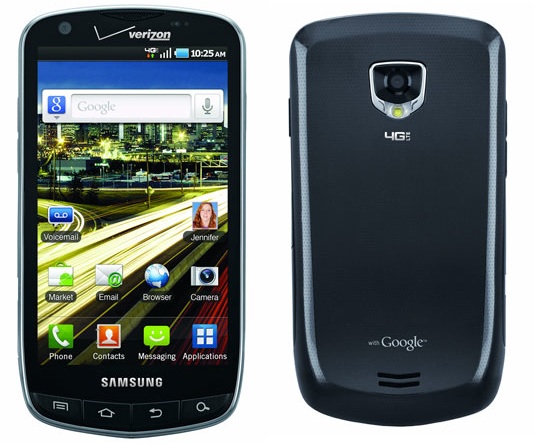
He pulled out his phone, and it looked something like this:
Samsung Android Phone
It wasn’t this exact model. I don’t think the model of Samsung phone pictured had been released, and his had had been from AT&T. After a quick search of images, this is the first one I found that looked like his.

But I pointed out the Samsung logo, rather hard to miss. And told him it wasn’t an Apple iPhone. That it was an Android phone.

He got a little huffy, and oddly enough accused me of being an Apple Hater. He showed me several things on the phone, specifically certain icons that did, indeed, look an awful lot like the icons for similar apps on my iPod Touch.

Now, it was a salesperson at an AT&T store who told him it was an iPhone Nano, and his own stubbornness (and perhaps a little bit of denial that he had been taken in by the salesperson) that was primarily to blame for his insistence that it was a cheap model of an iPhone. But the salesperson couldn’t have had a hope of getting away with it, and wouldn’t have succeeded in his deception if the phone itself, not just the general idea of a touch screen, but the specific icon set, the overall UI, and so on, had not been such a slavish knockoff of the iPhone.

I had played with several Android phones whose interfaces did not mimic iOS to the degree that this Samsung phone did. It’s not that difficult to make a touch screen user interface that looks and feels significantly different.

Copying is not competition, it’s deception. Copying is not innovation, it’s theft.

Telling someone they can’t sell a knock off is not stifling competition. You know what does stifle competition and innovation?

Encouraging or cheering on the people selling the knock-offs.

I do not think it means what you think it means

A few years ago an acquaintance discovered that a piece of artwork she had drawn, scanned, and posted on her own website had been taken by a clothing company and used on t-shirts, which they sold gazillions of. She spent a lot of time trying get them to stop using her art. She doubted she’d ever get them to pay her for it, she mostly wanted them to stop using her art without her permission.

She called them “thieves” and “lazy.” And she was correct.

So I was amused recently when some of her supporters called Apple a “patent troll” for suing Samsung over design theft.

“But wait,” you say, “It’s not the same thing! Apple is going after them just because they made something with a touch screen! They’re not going after them for copying a specific piece of artwork!”

Have you read the 300-page Apple multi-touch patent? It isn’t 300 pages of padding, it is a precise description of the heuristics underlying how the machine can tell the difference between an intentional two-fingered gesture and an inadvertent thumb from the other hand touching the screen at the same time the user’s index finger on the primary hand is touching the screen. Among a lot of other things. So that particular claim is not “it’s a screen that you touch” but rather, “it’s a touch screen which uses these precise algorithms in concert with these precise physical components to control the device in these precise ways.”

Whether or not algorithms and other software processes ought to be patentable (and there are valid arguments that they oughtn’t), under the current system they are. And if a touch device uses those precise algorithms and those precise components in that precise way, then it is copying, not inadvertently doing something superficially similar.

Some of the claims that Apple asserted in the lawsuit were much more of a stretch than that, and it appears that between the judge and the jury those were not upheld.

My other gripe is the now rampant misuse of the term “patent troll.” A patent troll is a person or “company” which does not produce any products of any sort, let alone anything that actually uses the patent under question. Instead, its sole economic activity is to sue people and companies who are making products which may or may not violate the patent, in order to force a financial settlement.

A recent classic example is a company that holds a patent, purchased many years ago from an “inventor” for an enhancement to a fax machine which would allow the owner of the fax machine to press a single button on the fax to send a message to the manufacturer in order to, among other things, purchase supplies for the machine. The inventor never built such a fax machine. He totally failed to convince any fax machine manufacturers to add such a feature to their machines.

Now a holding company which exists solely to sue people over patent violations has been using the patent to go after people who put a virtual button into their apps or web pages that users can click in order to buy stuff. The purpose of the lawsuits by this company is not to prevent people for having buttons you click to buy stuff, nor is the purpose to get people to think of some new way to buy stuff. The sole purpose of the lawsuit is to scare at least some of the people and companies to hand over money to make the lawsuit go away.

Apple did ask for money. They didn’t get as much as they asked for. And the amount they were awarded (we will see if they actually get even that much; even before an appeals process goes through, the trial judge may reduce the amount), while it would be enough to set you or me up for a life of incredible luxury, is actually not that big of a deal to either Samsung or Apple.

And the outcome Apple really wanted was accomplished long before the lawsuit went to the jury. The products the jury found in violation of the patents the jury upheld are almost all obsolete products. Once it was clear Apple was willing to sue, Samsung started changing the design of devices so it was less likely consumers would confuse their product with Apple’s.

And in the long run, I think that’s a good thing. No one is going to invent something better than what is currently on the market if everyone keeps copying each other. And while I think we have a lot of cool tools and toys to play with now—I love living in the future!—I want stuff that’s even cooler!

At least 20% cooler, if you please.

Identities

It has not been a fun weekend. Friday morning I was rudely shoved out of denial1 that I was sick. The sinus headache that woke me up before the alarm went off was so excruciating, I had to put an ice pack on my head2. I had a deadline, a document that needed to be in a draft suitable to email to a person responsible for training some customers by the end of the day. So I couldn’t take a sick day, I needed to work from home.

Many of my work projects can be handed off to colleagues in my department, but this one isn’t one of those. I started out in technical writing without formal training in the field. Oh, yes, I’d had lots of writing, communication, and journalism classes, as I kept changing majors. And I’d been actively writing (and studying writing) since I’d made the decision when I was six to be a writer34, but I was hired as employee number 6 in a small startup. Tech writing was only one of my duties, and I approached it by asking the question: if I had to use this, what would I want to know? Then I played with the software and the hardware until I knew everything5, and wrote it up.

When we started hiring people with prior experience in tech writing (as the company grew), I learned that many tech writers were very uncomfortable writing about hardware, for instance. And if they had their druthers, avoid understanding programming logic altogether. To be fair, in well designed consumer products, users should not have to understand programming to use the product. But many of the products I’ve supported over the years have been enterprise, server-side applications and the platforms and hardware they run on. My users are usually administrators and installers, not end-users.

The upshot of all this is, within every tech writing group/department6 I’ve been in, I’ve been the hardware guy. The person assigned to write installation guides and the other super-techie docs no one else wants to do. This product is one of those.

And we’re still in the process of changing our production tool. I and the other Principal Tech Writer are still configuring the new repository, stylesheets, and support tools while we’re working. And this particular deliverable type is not fully defined and developed. So I’m also having to work on that end at the same time. All with an insanely short delivery time.

In addition to being the hardware/operating system/programming guy, I’m also the fix things guy. If I had a dime for every time a co-worker has said, “If you can’t figure it out, I don’t know who could” when we’re talking about software misbehaving, I could retire to the Bahamas.

That’s really just another manifestation of my study-it-until-I-understand-the-inner-workings trait. While in an ideal world, a user shouldn’t need to understand programming logic to use a consumer software product, in the real world, understanding that logic can help. Particularly if you can also grok the fundamental paradigm of the product7, you can figure out how to make it do things the designers didn’t plan on, and you can diagnose problems they never anticipated.

Related to that, I’m always the one who figures out how to use new systems, implement them, stretch them to meet our needs, and so forth.

I like doing all of these things. I like explaining. I try to teach my co-workers how to do all the things I do. Tasks that they have to do frequently they learn. But there is always a lot of stuff that folks only vaguely remember I showed them. And the whole “think like a programmer” or “think like a troubleshooter” thing seems to be something you either have a knack for, or don’t.

Which means I’m always going to be “the only one who knows how to do that” guy.

And that’s not fun when you get so sick you have to cancel the monthly writers’ meeting and the game I run, but you still have to squeeze in work from home time to make the deadline.


Footnotes

1. These symptoms are just hay fever because we’ve had really high pollen counts

2. And took cold tablets and went back to sleep for a bit…

3. I asked Mom where books come from, and she found a great explanation of the publishing industry in some sort of kids’ encyclopedia during our next visit to the library, and I was hooked!

4. And I made my first fiction sale at the age of 16, so I was a pro long before I got into tech writing.

5. Relatively speaking. It also helped that my other duties included testing the software and hardware.

6. Although I worked at one company for over 20 years, over the course of that time I had 6 different supervisors, as the company grew, shifted direction, grew some more, shifted direction, was split in two, et cetera.

7. For instance, the paradigm of the now nearly-gone word processor, WordPerfect, was the typewriter and how a typist used it. Text and commands for formatting are processed linearly, much like a mechanical typewriter. The paradigm of MS Word, on the other hand is a mutated cascading stylesheet8.

8. Yes, I know Word has been around longer than CSS. Of course I do. I’ve been using Word (and supporting other people using Word) since before Microsoft released Windows. But that’s the paradigm9.

9. Mutated. Because while it gives the illusion of having taxonomic behavior, it also works as a reverse taxonomy, and occasionally as a non-Euclidean hierarchy. But that’s a story for another day.